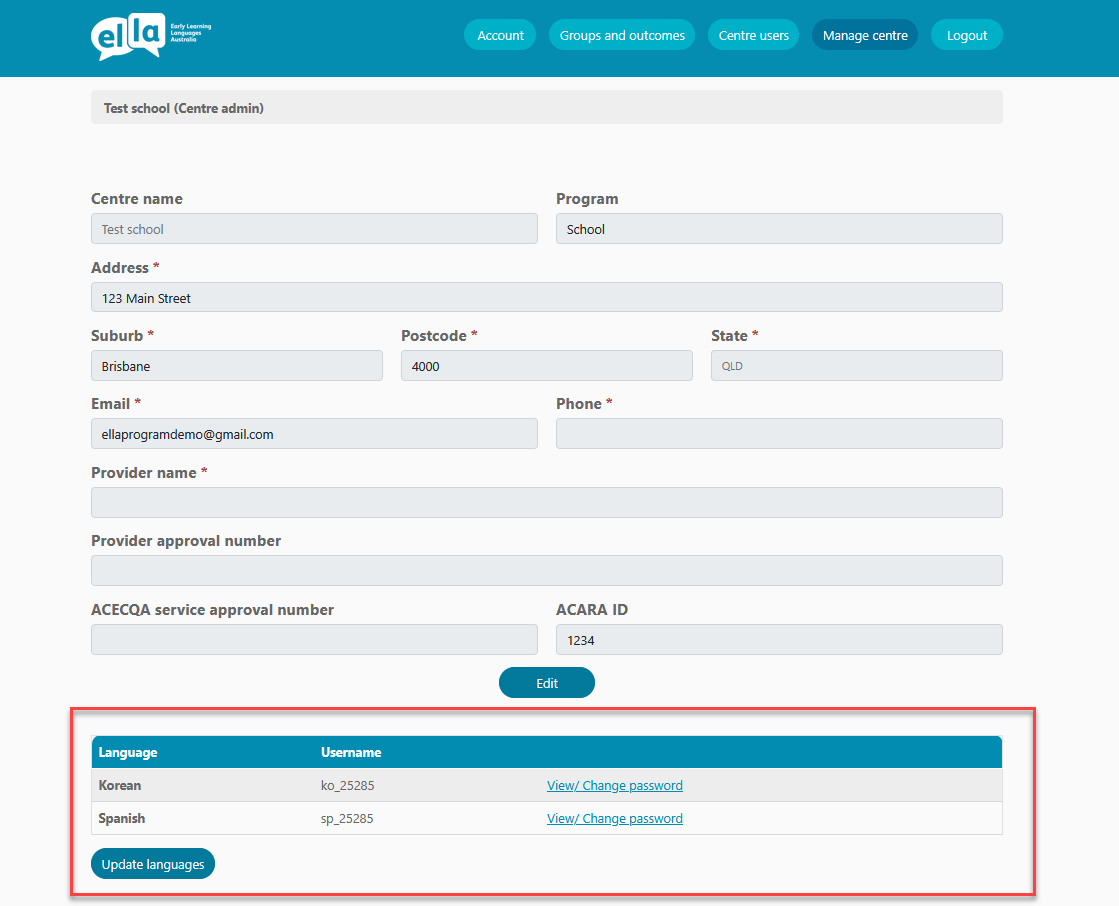
The Centre admin is responsible for selecting the language for your preschool/school. This is done during registration, but can be updated at any time in the Manage centre section of the Educator dashboard.
To choose a language, follow these steps.
- Go to the ELLA website (www.ella.edu.au) and log in to the Educator dashboard.
- Enter the multi-factor authentication (MFA) code sent to your email.
- Select Groups and outcomes.
- Select Manage centre in the main menu of the Educator dashboard.
- Scroll down to the Languages section of the page and select Update Languages.
- Select your chosen language and select Confirm.
Note:
- If you have chosen multiple languages, you can only use one ELLA language per tablet device. You will need separate devices for different languages.
- The Centre admin must update the app login password in the Manage centre section of the Educator dashboard before logging in to the apps.
Visit App logins for more information.