

Teachers are staff members responsible for delivering the ELLA program with children. Each Teacher has their own individual login and can set up groups and avatars in the Educator dashboard. They can also be linked to more than one preschool or school.
Set-up and manage your ELLA account
Teacher - FAQs
Can I have access to multiple preschool/school accounts?
Yes. You can use the same email address to be linked to more than one preschool or school. Simply submit a new registration form and select the new preschool or school from the dropdown list.
You can view all the preschools and schools you’re linked to in the Manage account section of the Educator dashboard.
To switch between preschool/school accounts, follow these steps.
- Go to the ELLA website (www.ella.edu.au) and log in to the Educator dashboard.
- Enter the multi-factor authentication (MFA) code sent to your email.
- Select Groups and outcomes.
- Select Change centre.
- Choose the preschool or school you want to switch to from the dropdown menu.
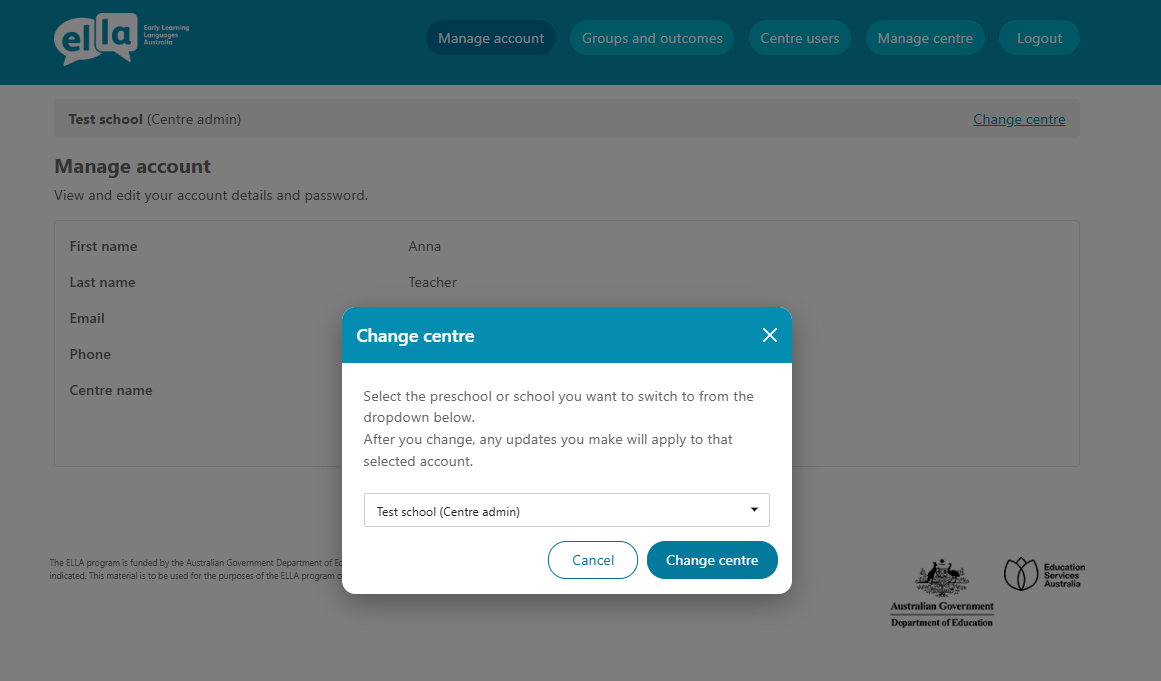
Screenshot Screenshot showing screen when you change from one preschool/school account to another.screen to chna
How do I reset my Educator dashboard password?
If you have forgotten your password you can change it by using the 'Forgot username and password?' link on the Educator dashboard login page.
- Select Forgot username and password? on the login page.
- Enter your Teacher email address.
- Check your email inbox for an email containing an ELLA password reset link (check your junk or spam folder if you don’t see it in your inbox).
- Select the link in the email to take you to a page to create a new password.
- Choose a new password.
Important:
- You cannot change your password more than once every 24 hours.
- You cannot reuse a password using only sequential numbers (for example, changing ‘thisismypassword1’ to ‘thisismypassword2’).
- Your account will be locked if you enter an incorrect password three times.
You can also change your password in the Educator dashboard.
- The Centre admin will need to go to the ELLA website (www.ella.edu.au) and log in to the Educator dashboard.
- Enter the multi-factor authentication (MFA) code sent to your email.
- Select Groups and outcomes.
- Select Account in the main menu of the Educator dashboard.
- Select Change password.
- Choose a new password.
It is recommended to change your ELLA passwords regularly – at least once per term is best practice. Strong passwords should be at least 15 characters long and include a mix of uppercase letters, numbers, and special characters. Here are some tips on creating strong passwords: https://www.cyber.gov.au/learn-basics/explore-basics/passphrases.
How do I unlock my Teacher account if I have forgotten my Educator dashboard password?
If you have forgotten your Teacher account login password and your account has been locked after three failed login attempts, you will need to contact your preschool or school’s Centre admin to have your account unlocked.
Once the Centre admin unlocks the account, you will receive an email notification prompting you to reset your ELLA dashboard login password before you can log back in.
Can I change my account details?
Yes. You can view and edit your account details, such as your name and password, at any time.
Teachers should follow these steps.
- Go to the ELLA website (www.ella.edu.au) and log in to the Educator dashboard.
- Enter the multi-factor authentication (MFA) code sent to your email.
- Select Groups and outcomes.
- Select Manage account in the main menu of the Educator dashboard.
- Select Edit.
- Update your details and select Save changes.
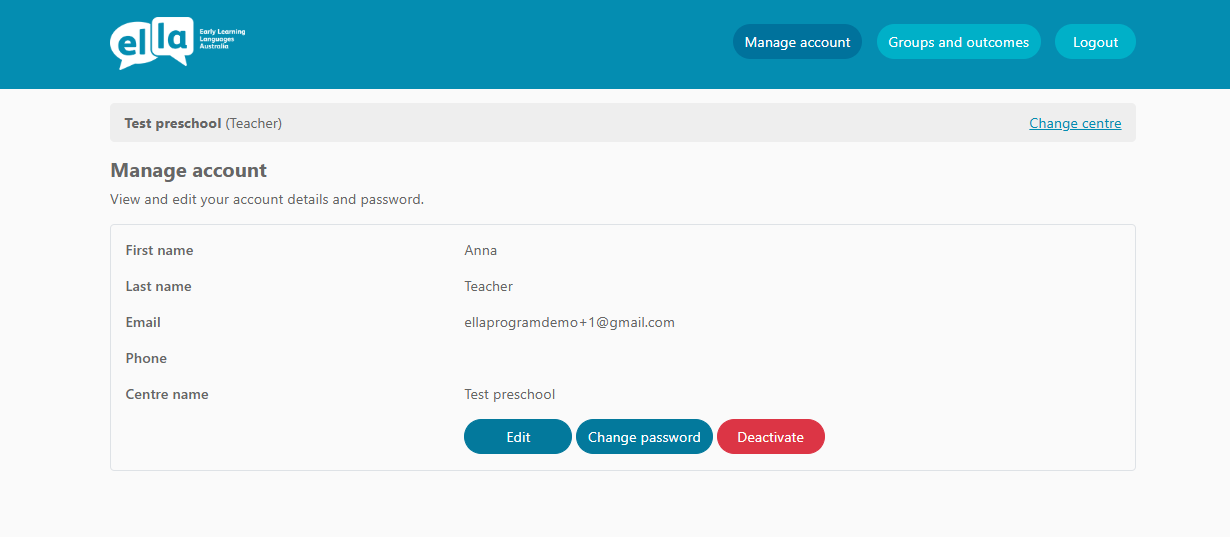
Screenshot showing Manage account screen where a Teacher can update account details.
How do I deactivate my account for a preschool/schoo?
You can cancel your registration with a preschool or school participating in the ELLA program at any time.
To deactivate your account, follow these steps.
- Go to the ELLA website (www.ella.edu.au) and log in to the Educator dashboard.
- Enter the multi-factor authentication (MFA) code sent to your email.
- Select Groups and outcomes.
- Select Manage account in the main menu of the Educator dashboard.
- Select Deactivate.
- An email will be sent to the Centre admin advising them that you have deactivated your account for that preschool or school.
Once your account is deactivated, you will be logged out of all active sessions and will no longer be able to access ELLA for that preschool or school. If you are linked to multiple preschools or schools, you will need deactivate your account for each one individually.
Screenshot showing Manage account screen where a Teacher can deactivate their account.

Have a question or need some help?
Contact the ELLA helpdesk
[email protected] 1800 468 303 (9 am – 4 pm AEST, Mon–Fri)